
Embark on a journey into the world of UX design, where creativity meets functionality to shape user experiences. Learn the fundamental principles and practices that drive the creation of seamless and intuitive interfaces.
Delve into the intricacies of user research, wireframing, information architecture, interaction design, visual design, and usability testing to unlock the secrets of successful UX design.
Introduction to UX Design

User Experience (UX) design is a crucial aspect of product development that focuses on creating meaningful and seamless experiences for users. It involves understanding the needs, behaviors, and preferences of users to design interfaces that are intuitive, efficient, and enjoyable to interact with.
Role of UX Design in Creating User-Friendly Interfaces
UX design plays a significant role in creating user-friendly interfaces by prioritizing the user's perspective throughout the design process. Designers conduct research, gather feedback, and iterate on designs to ensure that the final product meets the needs and expectations of the users.
By incorporating usability principles and best practices, UX designers aim to create interfaces that are easy to navigate, visually appealing, and satisfying to use.
Goals of UX Design in Enhancing User Satisfaction and Usability
The primary goals of UX design include enhancing user satisfaction and usability by focusing on the following aspects:
- Improving accessibility: Ensuring that the interface is accessible to users of all abilities and devices.
- Optimizing efficiency: Streamlining the user flow and reducing friction points to make interactions seamless.
- Increasing engagement: Designing interactive elements and compelling visuals to keep users engaged and interested.
- Building trust: Establishing a sense of trust and credibility through clear communication and transparent design.
By prioritizing these goals, UX designers can create products that not only meet the functional needs of users but also provide a positive and memorable user experience.
Principles of UX Design
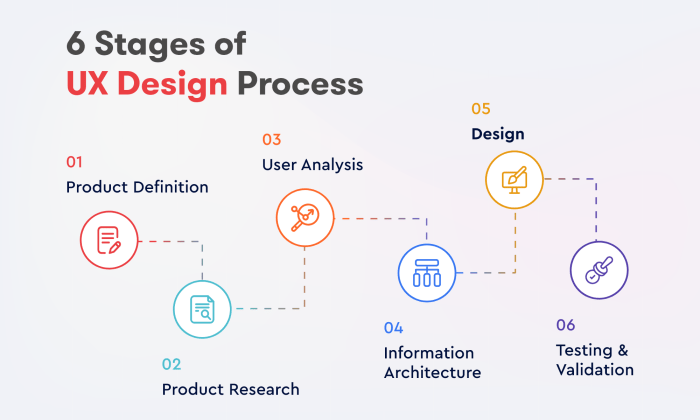
When it comes to UX design, there are several key principles that designers should keep in mind to create effective and user-friendly experiences for their audience. These principles include usability, accessibility, desirability, consistency, and user-centered design.
Usability
Usability is a fundamental principle in UX design that focuses on making products intuitive and easy to use. A usable design ensures that users can achieve their goals efficiently and effectively while interacting with a product or website.
Accessibility
Accessibility is another crucial principle that emphasizes designing products that can be used by individuals with varying abilities. This includes making sure that the design is perceivable, operable, understandable, and robust for all users, including those with disabilities.
Desirability
Desirability plays a significant role in UX design by focusing on creating products that users find visually appealing and emotionally engaging. A desirable design can attract and retain users, enhancing their overall experience with the product.
Consistency
Consistency is key in UX design as it helps users build mental models and navigate through a product seamlessly. By maintaining consistency in elements such as layout, colors, typography, and interactions, designers can improve usability and create a cohesive user experience.
User-Centered Design
User-centered design is a principle that revolves around placing the needs and preferences of users at the forefront of the design process. By involving users in research, testing, and feedback sessions, designers can create products that truly meet user expectations and deliver value.
User Research in UX Design
User research in UX design plays a crucial role in understanding the needs and preferences of the target users. By conducting thorough research, designers can create products that are user-friendly and meet the expectations of the users.
Methods of User Research
User research can be conducted through various methods such as surveys, interviews, and usability testing. Surveys help in collecting quantitative data and understanding user preferences on a larger scale. Interviews, on the other hand, provide qualitative insights into the user's behavior, needs, and pain points.
Usability testing involves observing users interacting with the product to identify usability issues and areas for improvement.
Importance of Empathy in User Research
Empathy is a key aspect of user research as it allows designers to put themselves in the user's shoes and understand their emotions, motivations, and frustrations. By empathizing with the users, designers can create products that truly resonate with them and address their needs effectively.
Empathy in user research leads to more human-centered and intuitive design solutions that ultimately enhance the overall user experience.
Wireframing and Prototyping
Wireframing and prototyping are essential steps in the UX design process that help designers visualize and test their ideas before moving on to the final product. While both wireframes and prototypes serve different purposes, they work together to create a seamless user experience.
Wireframes: Visualizing Layout and Structure
Wireframes are like blueprints for a website or app, outlining the basic structure and layout without focusing on design elements like colors or images. They help designers map out the flow of the interface, placement of elements, and overall navigation.
By creating wireframes, designers can quickly iterate on different layouts and make sure the user journey is intuitive and efficient.
Prototypes: Testing Functionality and Gathering Feedback
Prototypes, on the other hand, are interactive models that simulate the final product's functionality. They allow designers to test different interactions, transitions, and user flows to identify any usability issues or bugs. Prototypes are valuable for gathering feedback from stakeholders, users, and testing groups to refine the design before development begins.
By using prototypes, designers can ensure that the final product meets user expectations and addresses their needs effectively.
Information Architecture
Information architecture plays a crucial role in UX design by organizing content in a way that enhances user experience. It focuses on structuring, labeling, and categorizing information to facilitate intuitive navigation for users.
Principles of Information Architecture for Intuitive Navigation
- Clear Hierarchy: Establish a clear hierarchy of information to help users navigate through the content easily.
- Consistent Navigation: Maintain consistent navigation elements throughout the design to provide a seamless user experience.
- Contextual Clues: Use visual cues and contextually relevant labels to guide users in understanding the content structure.
- Progressive Disclosure: Gradually reveal more detailed information as users interact with the interface, reducing cognitive overload.
- User-Centric Approach: Design information architecture based on user research and behavior patterns to meet user needs effectively.
Importance of Clear Labeling and Categorization in UX Design
- Enhanced User Understanding: Clear labels help users quickly identify the purpose of each section or category, improving comprehension.
- Efficient Navigation: Well-defined categories and labels enable users to navigate the interface efficiently, reducing search time.
- Reduced Cognitive Load: Clear labeling and categorization reduce cognitive load on users, allowing them to focus on their primary tasks.
- Improved Findability: Proper categorization makes it easier for users to find the information they are looking for, enhancing the overall user experience.
- Consistency Across Platforms: Consistent labeling and categorization ensure a seamless experience across different devices and platforms.
Interaction Design
Interaction design focuses on creating engaging experiences through user interactions with a product. It involves designing how users will interact with a system, emphasizing usability, efficiency, and satisfaction.
Principles of Interactive Design
Interactive design principles aim to enhance user experience by focusing on intuitive navigation, clear feedback, and seamless interactions. Some key principles include:
- Consistency: Maintaining uniformity in design elements and interactions throughout the product.
- Feedback: Providing immediate and informative responses to user actions to guide their behavior.
- Affordances: Designing elements that suggest their functionality and potential interactions to users.
- User Control: Allowing users to navigate and interact with the product at their own pace and preferences.
Role of Feedback and Affordances
Feedback in interaction design is crucial as it informs users about the outcome of their actions, helping them understand the system better. It can be visual, auditory, or haptic, providing cues for users to proceed or adjust their actions. Affordances, on the other hand, are design elements that suggest how they can be interacted with, guiding users on how to use them effectively.
By incorporating clear feedback and affordances, designers can create intuitive and user-friendly interfaces that enhance the overall user experience.
Visual Design in UX
Visual design plays a crucial role in creating appealing interfaces that engage users and enhance their overall experience. It involves the strategic use of elements like color, typography, imagery, visual hierarchy, and balance to convey information effectively and guide users through the interface seamlessly.
Significance of Visual Design in UX
Visual design in UX is essential as it helps to establish a strong connection with users by creating visually pleasing interfaces that are easy to navigate. It also contributes to brand recognition, enhances usability, and improves overall user satisfaction.
- Color: The choice of colors can evoke emotions, communicate information, and create visual interest. It is important to use a consistent color scheme that aligns with the brand identity and enhances the user experience.
- Typography: The selection of fonts and text styles can impact readability, hierarchy, and the overall aesthetic of the interface. Using appropriate typography helps in conveying the right message and improving user engagement.
- Imagery: Images and graphics can enhance the visual appeal of the interface, convey information quickly, and create a memorable user experience. It is important to use high-quality visuals that are relevant to the content and resonate with the target audience.
Principles of Visual Hierarchy and Balance
Visual hierarchy refers to the arrangement of elements in a way that guides users' attention and helps them prioritize information. By using techniques like size, color, contrast, and placement, designers can create a clear hierarchy that leads users through the interface in a meaningful way.Balance in visual design ensures that the elements are distributed harmoniously across the interface, creating a sense of stability and cohesion.
It involves careful consideration of spacing, alignment, and symmetry to achieve a visually pleasing composition that is easy to interact with.
Usability Testing
Usability testing is a crucial step in the UX design process that involves evaluating a product by testing it with real users. This process helps identify usability issues, gather feedback, and make necessary improvements to enhance the overall user experience.
A/B Testing
A/B testing, also known as split testing, involves comparing two versions of a design to see which one performs better in terms of user engagement or conversion rates. By presenting different variations to users and analyzing their behavior, designers can determine which design is more effective and user-friendly.
Heuristic Evaluation
Heuristic evaluation is a method where usability experts review a product's interface based on established usability principles or heuristics. By identifying violations of these principles, designers can pinpoint potential issues and make informed decisions to improve the overall usability of the product.
Identifying and Fixing UX Design Issues
Usability testing is essential in identifying and fixing UX design issues because it provides real user feedback on the product's usability. By observing how users interact with the interface, designers can uncover pain points, navigation difficulties, or any other obstacles that hinder the user experience.
This feedback allows designers to make informed design decisions, iterate on the design, and ultimately create a more user-friendly product.
Epilogue
In conclusion, UX design is not just about aesthetics; it's about understanding user needs and crafting experiences that resonate. By implementing the principles discussed, you can elevate your design process and create impactful products that users love.
Detailed FAQs
What is the role of empathy in user research?
Empathy in user research enables designers to truly understand the emotions and needs of users, leading to more user-centric and effective UX design solutions.
How does visual hierarchy impact user interfaces?
Visual hierarchy guides users through the content by prioritizing elements based on importance, helping create a seamless user experience and improving usability.
What is the difference between wireframes and prototypes?
Wireframes are static representations of a design layout, while prototypes are interactive models that allow testing of functionality and user interactions.
![Milwaukee Siding Contractors [#1 Rated Online] - Vinyl, Wood, Metal ...](https://digilife.bandungnews.id/wp-content/uploads/2026/02/major-siding-installation-in-lower-east-side-milwaukee-75x75.jpg)





![Milwaukee Siding Contractors [#1 Rated Online] - Vinyl, Wood, Metal ...](https://digilife.bandungnews.id/wp-content/uploads/2026/02/major-siding-installation-in-lower-east-side-milwaukee-120x86.jpg)

![Milwaukee Siding Contractors [#1 Rated Online] - Vinyl, Wood, Metal ...](https://digilife.bandungnews.id/wp-content/uploads/2026/02/major-siding-installation-in-lower-east-side-milwaukee-350x250.jpg)